

TL;DR
- macOS treats a failed update check as "you’re up to date." When a scan fails for any reason (a server error, a timeout, a refused connection), softwareupdated publishes an empty list, drops the update from tonight’s queue and disarms install-tonight (the scheduled overnight install). It doesn’t distinguish a failed scan from a real "nothing new" when it replaces the list.
- One of Apple’s update servers is making it a daily problem.
17.171.47.23, one of the four addresses behindgdmf.apple.com, is missing the update brain every Mac needs for a scan, and Apple’s DNS hands it out in about a quarter of answers. - Fixing the server won’t fix the Mac. Pulling a bad server out of DNS stops new hits, but armed Macs that already checked against it may have lost their night, and no error status I could find would change that on today’s Macs.
- A DDM declaration can stall on it too. If a declaration’s first scan hits a failure, it enforces nothing, reports no error, and may not try again until its daily DDM check.
- It looks completely clean.
install.log,softwareupdateand System Settings all say "nothing available," and DDM status has nofailure-reason. Only the unified log has the error. - A Command Line Tools key can cost the night. An empty scan can leave a Mac armed for the CLT alone, so the next overnight install is the CLT instead of macOS.
The last post was about the mornings a Mac didn’t update. Here’s another one, and this time the Mac did everything right until one routine check in the evening.
27.2.1 is downloaded, keyed and armed for tonight. In the evening, softwareupdated runs its routine check, and DNS sends it to the one broken Apple server, in North Carolina. It answers "Assetset not found," softwareupdated disarms, and the Mac wakes up on the same macOS with the update still on disk.
Apple will fix the server. The real bug is on the Mac: macOS 27 treats any failed check as an empty one, on every Mac with automatic updates on, keyed or not. The server in North Carolina is just making it happen to about a quarter of scans this month.
How one failed scan cancels tonight
Follow that 404 through the Mac:
- mobileassetd gets the 404 and gives up. It turns the HTTP status into a MobileAsset error (a 404 is
MADownloadNotFound) and marks it "retry same," which sounds hopeful. The only retry it knows is falling back to Apple’s old XML catalog, and software update assets don’t have one. My own Mac logged the whole thought:Failed MAPallasFailedRetrySame but asset type does not support XML fallback. - The scan drops what it couldn’t get. With no update brain, the scan fails with
7307, and the side of the scan that failed (minor or major updates) comes back with no updates at all. - softwareupdated publishes the list anyway. The
7307goes back to whoever asked for the scan, but the code that setsavailableMobileSoftwareUpdatesdoesn’t take an error. Whatever survived the scan gets published, which is usually nothing:( ). - The disarm is a membership test. Right after publishing, if install-tonight has a queued update and it isn’t in the new list, softwareupdated cancels install-tonight:
Removing queued descriptor, thenSUOSUScheduler: DISARMED. It never looks at why the list is empty.
An empty answer from Apple can mean an update was pulled, and dropping the arm is right. A 404 from one of four servers means nothing of the sort: the other three were offering 27.2.1 the whole time.
And it isn’t just 404s. Every way a check can fail ends the same way, and for network failures softwareupdated doesn’t even pass the error on. It logs Not returning visible error to clients and publishes the empty list.
| What the server does | What mobileassetd makes of it |
|---|---|
| 404 (the broken server) | MADownloadNotFound |
| Refuses the connection | MADownloadCannotConnectToHost |
| Times out | MADownloadTimedOutResource |
| Fails TLS | MADownloadNetworkingError |
| 422 | MADownloadNoMatchFound |
| 429, and most other 4xx | MADownloadServerError |
500 or 503, with or without Retry-After |
MADownloadServerInternalError |
All of them take the same path to a disarm: the first four in testing, the rest in the code, since mobileassetd pins gdmf.apple.com to Apple’s own CA and a proxy can’t fake them. I found nothing in mobileassetd or the software update frameworks that reads Retry-After or treats a 429 or 503 differently.
It doesn’t take Apple, either. A Mac that’s offline when a check is due waits for the network, but one that’s online with broken DNS, behind a captive portal, or loses Wi-Fi halfway through a check gets the same empty list.
What you’ll see
From where an admin usually looks, nothing happened.
install.logshows a clean empty list, with no server error.softwareupdatesaysNo such updatefor a label you know is out, and System Settings says "Your Mac is up to date."- DDM status shows no
failure-reason.
Only the unified log has the error: the 7307 for the broken server, or Not returning visible error to clients for a network failure.
Nothing is thrown away. The update stays prepared, and the Mac re-arms at the next good check (about every six hours), or, if its unlock stash is gone, at the first password unlock after one. An unlock before a good check has nothing to arm, and softwareupdated says so in install.log:
2026-11-13 13:37:30+00 Mac softwareupdated[283]: -[SUOSUServiceDaemon setClientExternalizedLocalAuthenticationContext:userId:forHarvestMode:completion:]_block_invoke: What? No available updates? This shouldn't have been called if that were the case.
If no good check comes before the night, the night is gone.
A declaration that does nothing
The same failure hits plain DDM software update declarations. When a declaration arrives, softwareupdated scans for its target version right away. If that scan lands on the broken server, the brain query fails, the fallback scan fails the same way, and that’s the end of it:
-[SUOSUManagedServiceDaemon scanForDescriptorWithPMV:buildVersion:completion:]_block_invoke: No DDM updates found, fallback to scanning without PMV
SUOSUManagedServiceDaemon: No updates found for DDM to enforce
Nothing downloads, and ManagedProductMarketingVersion (the version pin the declaration set) is cleared. The Mac reports the declaration as active and valid, with no reasons and no failure-reason, so your MDM shows the declaration active and valid while nothing happens.
It doesn’t try again on its own, either. With the pin cleared, the next good background check logs Found DDM enforced install but handles the update like any other, and on a Mac without AutoInstallProductKeys it won’t download one that’s still ramped (is ramped, not downloadable at this time). The declaration may wait for its daily DDM check (more often near the deadline) or a change. An edit makes it scan again right away, but it also purges prepared updates on every Mac the declaration covers, and the new scan can hit the broken server again.
The Command Line Tools take the night
In the last post I said a Command Line Tools key can ride along with a keyed macOS update, but can’t arm on its own. An empty scan broke the second part.
It removes macOS from the queue, but the CLT stays on its own install-later list. The next periodic check finds only the CLT eligible, because of its key, and arms for it alone. When a good scan brings macOS back, later checks log already armed for later and can’t add it. So the next overnight install is the Command Line Tools, which don’t even need a restart. You wanted macOS and got a new clang. Without the CLT key, the empty scan arms nothing and the next good check arms macOS.
So a CLT key can leave a Mac doing something you didn’t expect after a bad scan, and removing the key doesn’t cancel a CLT-only arm that’s already set.
Where gdmf lives
gdmf.apple.com is where every Mac, iPhone and iPad asks Apple which updates exist (Apple lists it as the software update catalog). It’s IPv4 only, with four addresses (edges) behind its CNAME, gdmf.v.aaplimg.com. Going by ping times, each is in one of Apple’s US data centers.
| Edge | Apparent site |
|---|---|
17.23.18.34 |
Mesa, Arizona |
17.111.103.20 |
Reno, Nevada |
17.137.162.3 |
Prineville, Oregon |
17.171.47.23 |
Maiden, North Carolina |
Apple’s DNS hands all four out everywhere, so a Mac in Seattle can be sent to North Carolina. About a quarter of answers are the broken one, and a Mac lands on it on some scans and not others.
Apple could cheaply improve that for today’s Macs. Each answer has only one address. Put all four in every answer (plain round-robin DNS) and the Mac’s networking stack moves to the next one on its own when an edge refuses the connection or times out, so a dead edge costs a connection attempt instead of a night. It wouldn’t help with a 404 from an edge that connects fine, or a Mac still holding an open connection to a bad one.
What North Carolina is missing
The North Carolina edge is missing some asset sets. Send it a request modeled on a Mac’s, and the answers come back wrong.
| Query | 17.171.47.23 |
The other three |
|---|---|---|
| The Mac update brain (every Mac model, from 15, 26 or 27) | 404, "Assetset not found" | 200 |
| The macOS update list, for the 12 models listed below | 422, "getAsset_404" (200 since November 15) | 200 |
| The macOS update list, every other model | 200 | 200 |
| The iOS update brain | 422 | 200 |
The 422 was odd on its own. It means "Unprocessable Entity," but the body said getAsset_404, an internal "not found." A 404 wearing a 422.
The update brain is an asset softwareupdated fetches as part of every scan; it carries the logic for applying updates (Howard Oakley’s walk through a Tahoe update shows where it fits). No brain, no scan: softwareupdated logs [SUMacControllerErrorScanNoUpdateBrainFound=7307] Failed to locate update brain asset and gives up. So every Mac is affected, and until November 15 these 12 lost the update list too.
| Identifier | Model |
|---|---|
| iMac20,2 | iMac (Retina 5K, 27-inch, 2020) |
| iMacPro1,1 | iMac Pro |
| Mac13,1 | Mac Studio (M1 Max) |
| Mac14,2 | MacBook Air (M2, 2022) |
| Mac14,7 | MacBook Pro (13-inch, M2, 2022) |
| Mac15,8 | MacBook Pro (14-inch, 16-core M3 Max, Nov 2023) |
| Mac17,7 | MacBook Pro (14-inch, M5 Max) |
| Mac18,2 | iMac (24-inch, M6, 2026) |
| MacBookPro15,3 | MacBook Pro (15-inch, 2019) |
| MacBookPro16,4 | MacBook Pro (16-inch, 2019) |
| MacBookPro18,3 | MacBook Pro (14-inch, M1 Pro, 2021) |
| Macmini9,1 | Mac mini (M1, Late 2020) |
iPhones and iPads get a failed brain query there too, with their update lists fine.
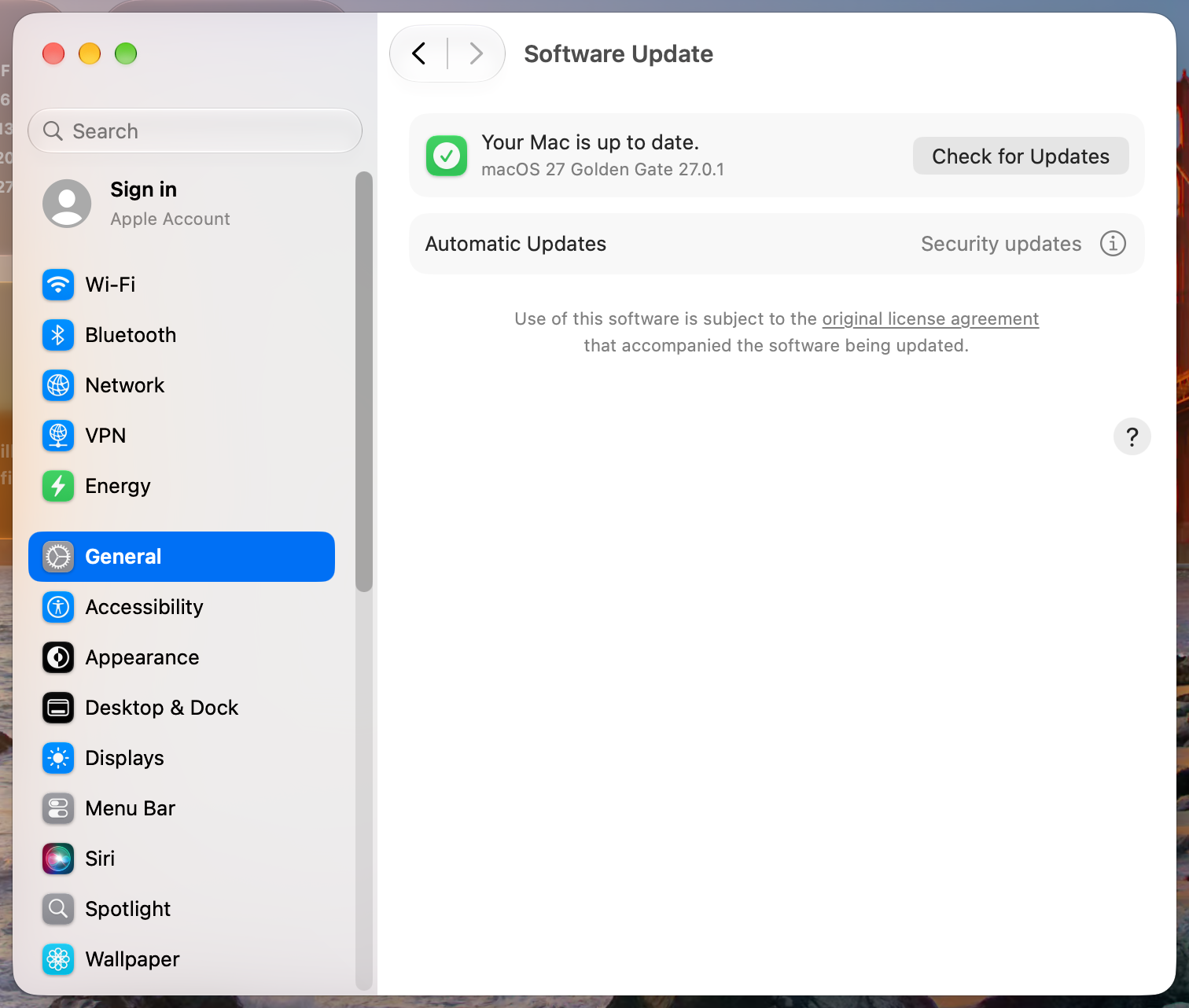
On the North Carolina edge, a 27.0.1 Mac’s Software Update says it’s up to date:
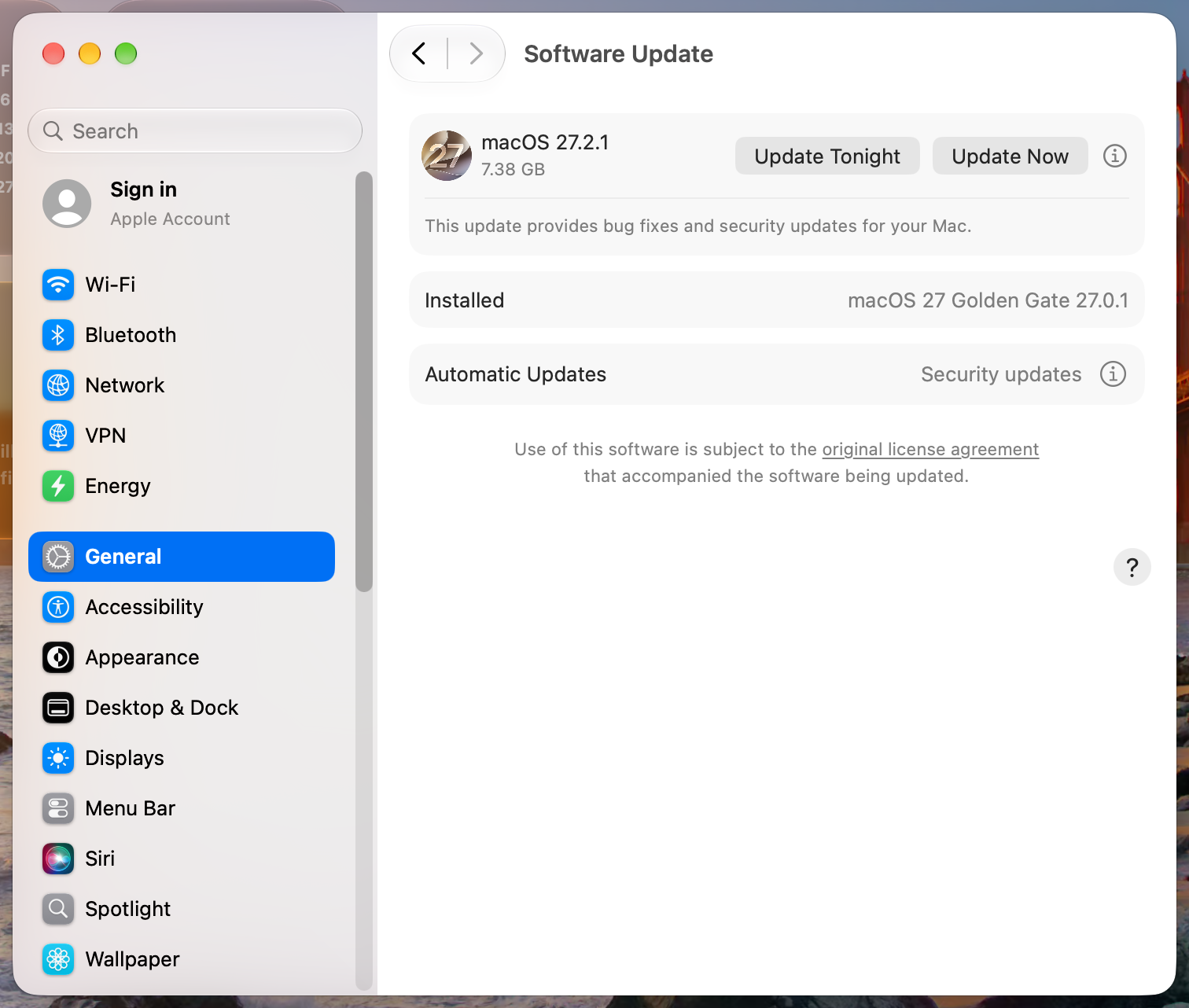
A few minutes later on a good edge, the same Mac offers 27.2.1:
Going by my logs, it has been broken since at least November 12 at 06:12 UTC, when my lab Macs first got the brain 404 (my own Mac’s first was at 08:07). The update lists came back on November 15 at about 17:40 UTC. As of 23:16 UTC that day, the brain was still missing.
Fixing the server isn’t enough
Apple can fix the server or pull it from DNS, which reaches most Macs within the record’s five-minute TTL, though mobileassetd can keep using an open connection for a while. Neither gives anything back: any armed Mac that checked against it while it was in rotation may already have disarmed.
How to check a Mac
How many of this Mac’s scans failed on the missing brain in the last two days:
log show --last 2d --style compact --predicate 'process == "softwareupdated" AND composedMessage CONTAINS "Event:ScanFailed State:ScanningForUpdateBrain"' | grep -c '^20'
Which edge this Mac gets right now (the answer is cached for up to five minutes, so check again later rather than straight away):
dscacheutil -q host -a name gdmf.apple.com
Which edge each scan actually used is harder, because mDNSResponder logs DNS answers only as per-Mac hashes. This script calibrates them with five lookups of its own (gdmf.apple.com, then <edge>.sslip.io for each edge, a third-party DNS service; Calibrated 0 of 4 means your DNS blocks it), then matches each scan to the answer logged while it ran. Otherwise it only reads. It needs swift from Xcode or the Command Line Tools (without them, swift offers to install them): save it as gdmf-scans.swift, chmod +x it, and run sudo ./gdmf-scans.swift.
#!/usr/bin/swift
// gdmf-scans.swift: which gdmf.apple.com server each of this Mac's recent update scans used, and how the scan ended.
// Read-only. Run it with sudo: sudo ./gdmf-scans.swift
/*
mDNSResponder logs DNS answers only as short hashes, the same on one Mac but different on every other. So the script first looks up gdmf.apple.com, then each known gdmf edge by a name that answers with that address (<ip>.sslip.io), and notes which hash this Mac logs for each. Then, for each scan, it reads the gdmf answer mDNSResponder logged during it.
*/
import Foundation
import OSLog

let EDGES = ["17.23.18.34", "17.111.103.20", "17.137.162.3", "17.171.47.23"]
let BROKEN = "17.171.47.23"
let HOURS = 48.0

// The capture groups of the first match of a pattern, or nil. Compiled patterns are cached.
var compiled: [String: NSRegularExpression] = [:]
func search(_ pattern: String, _ text: String) -> [String]? {
    if compiled[pattern] == nil { compiled[pattern] = try! NSRegularExpression(pattern: pattern) }
    guard let match = compiled[pattern]!.firstMatch(in: text, range: NSRange(text.startIndex..., in: text)) else { return nil }
    return (1..<match.numberOfRanges).map { i in Range(match.range(at: i), in: text).map { String(text[$0]) } ?? "" }
}

// Log messages between two times for a predicate, keeping those that match a pattern. Each call opens the store again, because a store only sees entries logged before it was opened.
func logLines(_ predicate: String, from start: Date, to end: Date, matching pattern: String) -> [(time: Date, message: String)] {
    guard let store = try? OSLogStore.local() else {
        print("Can't open the log store. Run it with sudo.")
        exit(1)
    }
    let entries = (try? store.getEntries(at: store.position(date: start), matching: NSPredicate(format: predicate))) ?? AnySequence([])
    var lines: [(time: Date, message: String)] = []
    for entry in entries {
        let done: Bool = autoreleasepool {
            if entry.date > end { return true }
            let message = entry.composedMessage
            if search(pattern, message) != nil { lines.append((entry.date, message)) }
            return false
        }
        if done { break }
    }
    return lines
}

// Look a name up through mDNSResponder and return its IPv4 addresses.
func resolve(_ host: String) -> [String] {
    var hints = addrinfo(ai_flags: 0, ai_family: AF_INET, ai_socktype: SOCK_STREAM, ai_protocol: 0, ai_addrlen: 0, ai_canonname: nil, ai_addr: nil, ai_next: nil)
    var result: UnsafeMutablePointer<addrinfo>?
    guard getaddrinfo(host, "443", &hints, &result) == 0 else { return [] }
    defer { freeaddrinfo(result) }
    var addresses = Set<String>()
    var next = result
    while let info = next {
        let ip = info.pointee.ai_addr.withMemoryRebound(to: sockaddr_in.self, capacity: 1) { String(cString: inet_ntoa($0.pointee.sin_addr)) }
        addresses.insert(ip)
        next = info.pointee.ai_next
    }
    return addresses.sorted()
}

// 1. Calibrate: gdmf.apple.com first, then one lookup per edge.
let calibrationStart = Date().addingTimeInterval(-1)
_ = resolve("gdmf.apple.com")
let asked = EDGES.filter { resolve("\($0).sslip.io").contains($0) }
Thread.sleep(forTimeInterval: 1.5)  // mDNSResponder's lines reach the log a moment later

let pid = ProcessInfo.processInfo.processIdentifier
let soon = Date().addingTimeInterval(5)
let starts = logLines("process == \"mDNSResponder\" AND composedMessage CONTAINS \"client pid: \(pid) \"", from: calibrationStart, to: soon, matching: "getaddrinfo start|DNSServiceQueryRecord START")
let results = logLines("process == \"mDNSResponder\" AND (composedMessage CONTAINS \"getaddrinfo result\" OR composedMessage CONTAINS \"DNSServiceQueryRecord result\")", from: calibrationStart, to: soon, matching: "type: (?:A|CNAME), rdata:")

// This script's own requests, in order, each name once: (request id, name hash).
var requests: [(id: String, name: String)] = []
for line in starts {
    if let g = search(#"\[(R\d+)\] (?:getaddrinfo start|DNSServiceQueryRecord START) .*?(?:hostname|qname): \S+ <dn:([^>]+)>"#, line.message), !requests.contains(where: { $0.name == g[1] }) {
        requests.append((g[0], g[1]))
    }
}
// Every answer, by request id: (name hash, record type, address hash).
var answers: [String: [(name: String, type: String, rdata: String)]] = [:]
for line in results {
    if let g = search(#"\[(R\d+)->Q\d+\] (?:getaddrinfo|DNSServiceQueryRecord) result .*?name(?: hash)?: <dn:([^>]+)>, type: (A|CNAME), rdata: (?:<private> )?<(?:ipv4|rd):([^>]+)>"#, line.message) {
        answers[g[0], default: []].append((g[1], g[2], g[3]))
    }
}

guard !requests.isEmpty else {
    print("Couldn't find this script's own lookups in mDNSResponder's log.")
    exit(1)
}
let gdmfAnswers = answers[requests.removeFirst().id] ?? []
// The hash of the name the gdmf answers are logged under (gdmf.v.aaplimg.com).
guard let target = gdmfAnswers.first(where: { $0.type == "CNAME" })?.rdata ?? gdmfAnswers.first(where: { $0.type == "A" })?.name else {
    print("Couldn't calibrate the gdmf name.")
    exit(1)
}
var edgeFor: [String: String] = [:]  // address hash -> edge
for (ip, request) in zip(EDGES, requests) where asked.contains(ip) {  // requests are in lookup order, one per edge
    if let a = (answers[request.id] ?? []).last(where: { $0.type == "A" }) {
        edgeFor[a.rdata] = ip
    }
}
print("Calibrated \(edgeFor.count) of \(EDGES.count) edges.\n")

// 2. The scans, from softwareupdated's own log.
struct Scan {
    var start: Date
    var kind: String
    var outcome = ""
    var end: Date? = nil
    var edge = ""
}
var scans: [Scan] = []
let scanLines = logLines("process == \"softwareupdated\" AND (composedMessage CONTAINS \"Starting scan with options\" OR composedMessage CONTAINS \"Event:ScanFailed\" OR composedMessage CONTAINS \"Setting availableMobileSoftwareUpdates\")", from: Date().addingTimeInterval(-HOURS * 3600), to: Date(), matching: "Starting scan|ScanFailed|availableMobileSoftwareUpdates")
for (time, message) in scanLines {
    if let g = search(#"Starting scan with options: Background=(\d)"#, message) {
        scans.append(Scan(start: time, kind: g[0] == "1" ? "background" : "user or CLI"))
        continue
    }
    guard var scan = scans.last, scan.end == nil else { continue }
    if message.contains("State:ScanningForSplatUpdates") { continue }  // the separate security-update check fails on every edge alike
    if let g = search(#"Event:ScanFailed State:(\w+)"#, message) {
        scan.outcome = "failed (\(g[0]))"
    } else if search(#"Setting availableMobileSoftwareUpdates = \(\s*\)"#, message) != nil {
        scan.outcome = "empty"
    } else if message.contains("Setting availableMobileSoftwareUpdates = (") {
        scan.outcome = "offered"
    } else {
        continue
    }
    scan.end = time
    scans[scans.count - 1] = scan
}

// 3. For each scan, the last fresh gdmf answer mDNSResponder logged while it ran.
let answerPattern = #" result .*<dn:"# + NSRegularExpression.escapedPattern(for: target) + #">.*type: A, rdata: (?:<private> )?<(?:ipv4|rd):([^>]+)>.*expired: no"#
for i in scans.indices {
    guard let end = scans[i].end else { continue }
    let from = end.timeIntervalSince(scans[i].start) < 300 ? scans[i].start.addingTimeInterval(-2) : end.addingTimeInterval(-60)
    let lookups = logLines("process == \"mDNSResponder\"", from: from, to: end, matching: answerPattern)
    if let last = lookups.last, let g = search(answerPattern, last.message) {
        scans[i].edge = edgeFor[g[0]] ?? "(unknown edge)"
    } else {
        scans[i].edge = "(no lookup during the scan)"
    }
}

let formatter = DateFormatter()
formatter.dateFormat = "yyyy-MM-dd HH:mm:ss"
func pad(_ s: String, _ width: Int) -> String { s.padding(toLength: max(width, s.count), withPad: " ", startingAt: 0) }

print(pad("Scan (local)", 19), pad("Kind", 11), pad("Outcome", 34), "gdmf edge", separator: "  ")
for scan in scans where scan.end != nil {
    let flag = scan.edge == BROKEN ? "  <- the broken edge" : ""
    print(pad(formatter.string(from: scan.start), 19), pad(scan.kind, 11), pad(scan.outcome, 34), scan.edge + flag, separator: "  ")
}
On a Mac that has been hitting the bad edge, it looks like this, trimmed to the last three scans:
Calibrated 4 of 4 edges.

Scan (local)         Kind         Outcome                             gdmf edge
2026-11-15 02:06:13  background   offered                             (no lookup during the scan)
2026-11-15 08:10:07  background   failed (ScanningForUpdateBrain)     17.171.47.23  <- the broken edge
2026-11-15 14:07:53  background   offered                             17.137.162.3
(no lookup during the scan) means either the lines have aged out (mDNSResponder keeps about a day of them) or the scan reused an open connection and never looked the name up.
And what it cost:
grep -E 'SUOSUScheduler: (ARMED|DISARMED)|Removing queued descriptor' /var/log/install.log | tail -6
An armed Mac going through one scan on the broken server looks like this:
2026-11-14 12:35:15-08 Mac softwareupdated[281]: SUOSUScheduler: ARMED (mode=1, simulated=NO)
2026-11-14 12:36:30-08 Mac softwareupdated[281]: SUOSUInstallTonightManager: Removing queued descriptor SUMacControllerDescriptor(UUID:12FAA7C2-C30D-5464-8DE4-0D3CD0627DF4 SU:macOS 27.2.1 26B131 (Customer)(SU) ...
2026-11-14 12:36:30-08 Mac softwareupdated[281]: SUOSUScheduler: DISARMED (mode=1)
2026-11-14 12:37:45-08 Mac softwareupdated[281]: SUOSUScheduler: ARMED (mode=1, simulated=NO)
The disarm came a second after that scan started. (I forced the re-arm here with a background check and a password unlock; left alone, it waits for the next good check.) A DISARMED with no ARMED after it before the night is a lost night. Don’t run softwareupdate -l to hurry it: that’s a scan too, and every scan a script or EA runs is another chance to land on the broken edge.
What to do about it
- Don’t pin a good edge fleet-wide. A
gdmf.apple.comline in/etc/hostspointing at a good edge fixes a Mac within a few minutes, but Apple moves these addresses, and a pin that goes stale breaks every update check on every Mac that has it. - Don’t block the bad address either. A refused connection disarms the same way.
- Nudge a stalled declaration by moving the stalled Macs to their own copy of it, so the change doesn’t purge anyone else’s prepared update. A stalled Mac has logged
No updates found for DDM to enforce, and your MDM shows the declaration active with no pending version. - Leave a few days between a declaration and its deadline, since a failed first scan may not be retried until the next daily check.
- File a Feedback asking for software update to be resilient to server and network errors. The server will get fixed either way.
The fix that matters is in softwareupdated and mobileassetd. Here’s what I’d ask Apple to change:
- Don’t cancel install-tonight when a scan errored, for any reason, including the 8400s that are hidden from clients. Keep the previous result and the arm instead of publishing an empty list.
- Retry a failed asset query on a fresh connection, ideally to another address. mobileassetd keeps its connection open between requests, so a check half a minute after a bad one can still go to North Carolina.
- On a transient failure, fall back to the brain already on disk for an update that’s prepared and armed, instead of failing the scan.
- Retry a declaration’s scan after it fails, instead of waiting for the next daily check.
- Let a later good scan add macOS to an arm that’s already set, instead of
already armed for laterkeeping it out until another check. - Report a failed scan as a failure: in
install.log, in Software Update and in DDM status’ssoftwareupdate.failure-reason.
Most scans still land on one of the three good servers, and a Mac that lost its arm in the evening often gets it back at the next good check. Apple will fix the server in North Carolina, and when it does, this goes back to being a bug you only hit on a bad network or a bad day at Apple. That’s still a bug. The Mac had the update downloaded, prepared and armed, and it let one 404 talk it out of installing.
Further reading:
- How macOS 26 Tahoe updates, Howard Oakley’s series, especially part 3 on catalogs and part 4 on download, preparation and installation.
- Explainer: macOS updaters, also Eclectic Light, on what the update brain is.
- MobileAsset on The Apple Wiki, and cj123/pallas and blacktop/ipsw, for the requests a Mac sends to
gdmf.apple.com. - The Nightmare of Apple’s OTA Update, Mickey Jin’s security research into the update path, including the brain.
